Es mostren els missatges amb l'etiqueta de comentaris SAPS. Mostrar tots els missatges

dijous, 1 de setembre del 2016

Phases of the SAPS Benchmark

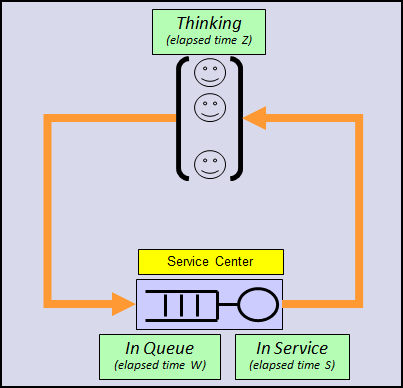
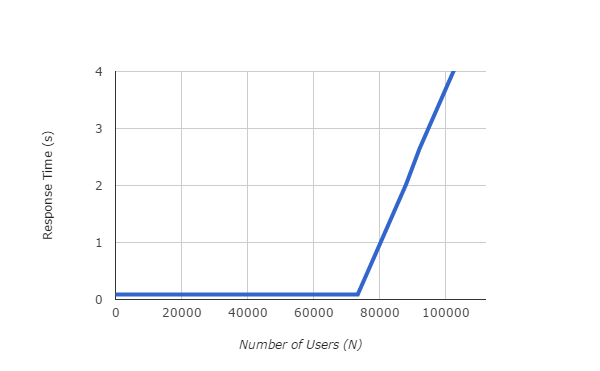
The SAPS benchmark fits very closely in the model analyzed in the post "Phases of the Response Time". In essence the benchmark is performed by progressively increasing the customer population, and monitoring the response time.  When response time reaches 1 second, the measured throughput, as expressed in dialog steps per minute, is the SAPS value. The think time remains constant at 10 s.


SAPS is a performance metric measuring throughput: 1 SAPS is 1 dialog step (a unit of work defined by SAP) per minute. This basically means 1 customer service per minute


Model Calibration

Let us consider, without loss of generality, the benchmark number 2014034, corresponding to an IBM POWER E870.


According to the benchmark certificate these are the measured values:
  • m = 640, the number of concurrent HW threads,
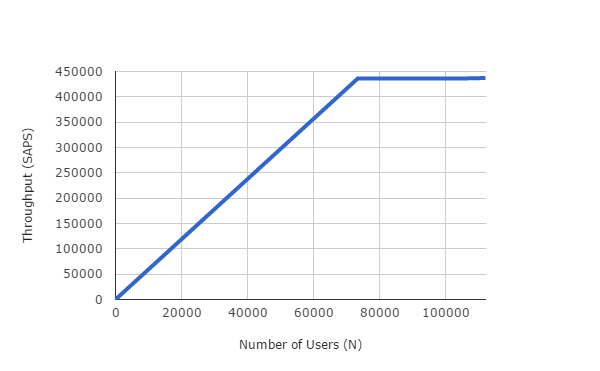
  • X = 26166000 ds/h = 436100 ds/min (SAPS).
  • N = 79750, the number of users.
  • R = 0.97 s, the average response time.


The service time is derived from those values:
  • S = m/B = 0.088 s/ds.
As R>>S the system must be well above the saturation point.  The saturation point N* is N*=m(1+Z/S)= 73323, and N, as stated in the benchmark certification, is 79750. Clearly N>N*, confirming the hypothesis that the system is operating well over the saturation point.


At this point we have our simple model well calibrated. To double check it, we can see that the response time predicted by our simple model would for a population of N=79750, the benchmark population, is 0.969s, while in the certification the response time in 0.97 s, a very close agreement!
Prognosis (Prediction)


The key benefit of having a simple model for studying the performance behavior of more complex systems is the prediction ability it gives to us. We ask and the model responds.

Question .- If the response time limit in the SAP benchmark were 2 s instead of 1 s, what would the system throughput (SAPS) be?
Answer.- Contrary to what some may think... it will remain almost the same! Being above the saturation point the model predicts the same throughput, equal to the maximum throughput (system bandwidth).  The delta SAPS for this change will be very slight and not significant.

Question.- If response time limit in the SAP benchmark were 0.5 s instead of 1 s, what would the system throughput (SAPS) be?
Answer.- The response is the same as before: almost the same. A response time of 0.5 is also above the saturation point and this implies that the system throughput will be the same. In the real world there would be a non significative (negative) delta.


We've varied the response time limit by a wide margin, from -50% (here) to +100% (previous case) and the SAPS remain almost the same... I bet you wouldn't have said so before reading this article.

Question.- But...what changes then between current 1 s and new 0.5 s?
Answer.- The number of benchmark users needed to get to the response time limit, less in the 0.5s than in the 1s case.


Question.- With current benchmark definition and 90000 users, what will the expected response time?

Answer.- Looking at the (number of users, response time) graph above, you can conclude the response time will be around 2.4 s.

divendres, 29 d’abril del 2016

Introducing the Response Time

Introducing the Response Time
The response time is the loser in the set of all performance metrics. It's systematically ignored in almost every sizing, it’s neither measured nor accounted in most cases, and it's only marginally referenced in certain benchmark definitions. Clearly, the throughput is the winner: SAPS, IOPS, transactions per second are throughput metrics, not response time ones.

But from the end user point of view the response time is the king. Any service center performs very well or very poorly according to the response time perceived by its users. When the response time is bad It doesn't matter to the customers if the system administrator proclaims they are working with a many-oooops-per-second system. Just the system is slow and, consequently, bad. Period.

The Service Center

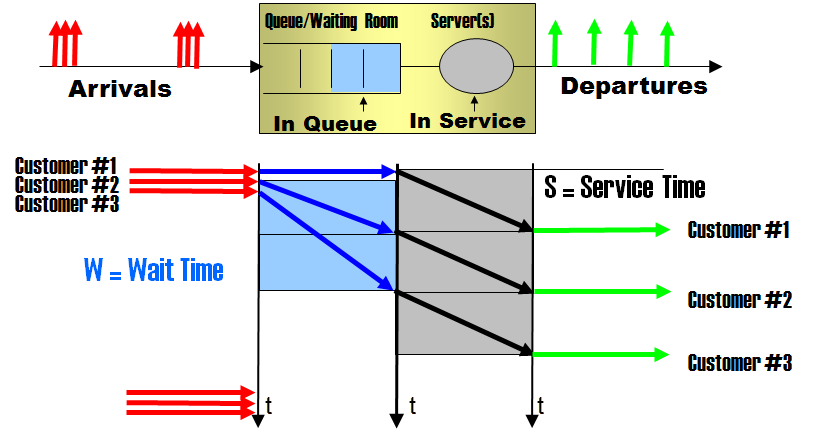
Look at the following picture, an idealization of any service center. A service center is a place, logical or physical,  where customers or users enter, are given a certain service by a worker (or a server), and exit. There's a line (queue) where arriving customers can queue and wait if all the workers are busy.


Figure: Service center with server(s), queue, and arriving  and departing customers.


You interact with service centers everywhere, as it is very general concept. For example:

Service Center
Service Given
Customer
Worker
Hairdresser’s
A haircut
People needing a haircut
Hairdresser
Our Company department
A step in an opportunity forward path
Company customers
Yourself
OLTP IT Server
CPU time
Users entering transactions at their terminals
CPU cores
Supermarket checkout
The checkout payment
Supermarket customers
Cashier
Bus Transport
A transport from place A to place B
Passengers
The driver and the bus
Public office desk
A request to the public administration.
Citizens
Public servant
Machine Repair Center
Fixing the malfunctioning machine
Machines
Repairman

A service center is fully characterized by the following magnitudes:
  • The service time (S): the elapsed time a service takes,
  • The number of servers (m):  the number of customers that can receive service simultaneously.

The Response Time

The Response Time (R) is the time elapsed from the arrival of a customer to the service center to its departure after receiving service.


The response time has two contributions: the service time (S)  and the wait time (W), resulting in this fundamental relationship:

R = W + S

To illustrate this look at the following scenario where we have depicted the flow of several customers through a very simple service center (m=1, S=cte)


  • Customer #1  arrives a t=0, finds the worker/server idle, spends no time at all at waiting, is given a certain service taking S units of time, and exits the center of service at t=S. The wait time is 0. The response time is S.
  • Customer #2  arrives a t=S, spends no time at all waiting, is given a certain service taking S units of time, and exits the center of service at t=2S. The wait time is 0. The response time is S.
  • Customer #3  arrives a t=2S, spends no time at all waiting, is given a certain service taking S units of time, and exits the center of service at t=3S. The wait time is 0. The response time is S.

In this scenario none of its customers must wait for service, and so the response time is equal to the service time. The wait time contribution is zero.

Now look at the following scenario differing from the previous one in the way customers arrive.

  • Customer #1  arrives a t=0, spends no time at all at the queue, is given a certain service taking S units of time, and exits the center of service at t=S. The wait time is 0. The response time is S.
  • Customer #2  arrives a t=0, has to wait in queue S units of time, is given a service taking S units of time, and exits at t=2S. The wait time is S. The response time is 2S.
  • Customer #3  arrives a t=0, has to wait in queue 2S units of time, is given a service taking S units of time, and exits at t=3S. The wait time is 2S. The response time is 3S.

Some of the customers must wait for service and, consequently the response time has the two contributions: the service time (grey) and the wait time (blue),


Waiting for the SAPS

Looking at a SAPS benchmark report, may you tell which contribution to the response time is bigger: the wait or the service time?

Remember this first: SAPS is a performance metric measuring throughput: 1 SAPS is 1 customer service per minute, or 1 dialog step per minute (dialog step is an SAP term). The benchmark is essentially performed by progressively increasing the customer population, and monitoring the response time.  When the response time reaches 1 second (R=1 s), the measured throughput, as expressed in dialog steps per minute, is the SAPS value.

A SAP server in essence is a service center for SAP dialog steps. And according to the certification report these are its measured numbers:
  • There are 128 workers, corresponding to 128 HW threads executing dialog steps, so m=128.
  • The average response time is measured to be 0.98 s. R=0.98 s.
  • 5113000 dialog steps are executed (serviced) in an hour.

And from the above the following values can be easily derived:
  • The service time is S=0.090 s , as every worker processes (5113000/128) ds per hour, and then  ( 1 h / (5113000/128) ds ) · ( 3600 s/h) = 0.0901 s.
  • The wait time is W= 0.89 s  (W = R - S).

The dialog step response time is decomposed into 0.89 s of wait time and 0.09 s of service time:


Wow!  W >> S, in fact W ~ 10·S. So it’s sure there is a queue of dialog steps waiting  to be processed. If you scale this to, for example, a supermarket checkout counter that spends  5 minutes per customer, W=10·S means a 50 minutes waiting in the line!

Coming Soon

This is the first blog entry of the Demystifying the Response Time series, an exploration into the response time jungle. There are very interesting facts and analysis ahead. Stay tuned.


New blog URL:   http://www.ibm.com/blogs/performance
Mirror blog:  http://demystperf.blogspot.com

dilluns, 15 de febrer del 2016

How much capacity does a virtual cpu guarantee?

The rapid answer to the question how much capacity does a virtual cpu guarantee? is as much as one core can deliver (PowerVM VP), or as much as one thread can deliver (ESX vCPU). This is the best case, and so has been In the two previous entries ( “Don’t put in the same bag Xeon and POWER virtual CPUs”, “More on ESX vCPU versus PowerVM VP” ). But the best case is not necessarily the most common case.

Two typical non-best cases in the real world:
  • For a good technical reason, trying to leverage the “sharing” capability that virtualization technologies enable,
  • For a bad economic reason, reselling the same underlying physical capacity to more than one customer.

Independently of the true reason, you should be aware of a parameter, assigned to a VM, that helps a lot in specifying how much capacity does your particular VP (vCPU) guarantee. It’s called Entitlement in PowerVM, and Reservation in ESX. These parameters have a very interesting property: they cannot be overcommitted, that is, you cannot distribute among the VMs more Entitled (Reserved) capacity than is available in the physical machine. On the contrary, you can create and distribute more VPs (vCPUs) than existing cores (threads). If you simply divide the VM Entitlement (Reservation) by the number of VP (vCPU) in the VM you will have how much a virtual cpu guarantees.

Let us illustrate this with a very simple scenario, a reasonable setup for two VMs, the Red VM and the Blue VM, with the same importance. This situation may arise, i.e.,  when two productive environments share the same PM.


Physical Machine
IBM POWER S824 2s/24c/192t POWER8 @3.52GHz
Cores
24
SAPS
115870
SAPS/core
4828


Red VM

Blue VM
12
Entitlement (cores)
12
24
Virtual Processors
24
Uncapped
Cap/Uncap
Uncapped

The reason for 24 VP per VM, instead of 12 VP, is for the VM to be able to reach the 100% capacity of the PM.

In the best case (for the Red VM) the Blue VM remains idle, and under such a circumstance the 24 Red VPs can use the 24 cores, giving the equivalence 1 VP = 1 core = 4280 SAPS. To simplify we are not taking into account capacity reductions due to virtualization.


In the worst case (for the Red VM), the Blue VM is fully loaded and then the 24 Red VPs can use 12 cores at most, the Entitlement, giving the equivalence 1 VP = 0.5 core = 2140 SAPS.


So the actual Red VP capacity will be somewhere in the interval [2140, 4280] SAPS, depending on the Blue VM usage. Never will be less than 2140 SAPS, the guaranteed or worst case. Never will be more than 4280 SAPS, the underlying core capacity.

By the way, this is a good illustration of the good technical reason for overcommitting VP (vCPU) mentioned above. But may also be an example of the bad economic reason: just imagine that the owner of the physical machine sells the 24 VPs to the red customer, and 24 VPs to the blue customer, promising 1 VP = 4280 SAPS to everyone!

Summarizing


If you only know the number of VP (vCPU) that your VM has been assigned, you don’t have enough information to establish its precise capacity point. At least you should be informed of its Entitlement (Reservation) to derive the guaranteed capacity.


PowerVM
ESX
Best Case
1 VP = 1 core
1 vCPU = 1 thread
Guaranteed /
Worst Case
1 VP = Entitlement/NumberofVP
1 vCPU = Reservation/NumberofvCPU


Mirror: https://www-304.ibm.com/connections/blogs/performance/entry/how_much_capacity_does_a_virtual_cpu_guarantee?lang=en_us